Configuring Windows for Maximum Performance Follow-up

There were some great replies to my CDM question about configuring a laptop for live performance. The best stuff:

  • Autoruns - I hadn't heard of this program but I'll certainly be using it from now on. You can monitor and alter your loaded drivers, DLLs, services, startup programs and much much more. Great stuff.
  • MusicXP.net - This site has a lot of great tuning techniques for audio.
  • XPLite - I mentioned this in my question along with nLite but one person recommended XPLite.
  • Process Explorer - I've been using Process Explorer for at least a year now and it's fantastic, I can't go back to the default Windows XP task manager.
  • Process Monitor - I haven't tried this one but it looks useful.

And there's this awesome tip from art:

Ableton Live custom windows interface

When I use Live in a live environment, I run it as a ‘Custom user interface’ or ’shell’ in Windows XP Professional. Basically what this is if you aren’t familiar with it, is replacing Explorer with Live as a shell. This means there is no desktop environment, no taskbar, no start menu, no applets running, etc.

There are many advantages to this when using Live - improved stability, free memory, improved performance, etc. The disadvantage is you lose a practical way to multi-task. (But who needs multi-tasking when you only need to run Live live?)

To accomplish this in Windows XP Pro, type ‘gpedit.msc’ in the run command. This brings up the ‘Group Policy Editor’. Under ‘User Configuration’ / ‘Administrative Templates’ / ‘System’, there is a setting called ‘Custom user interface’. By default this setting is ‘Not Configured’ (meaning Explorer).

If you select ‘Enabled’ and type in the path to Live (or any application), Windows will boot into Live upon startup without anything else running.

You must include parenthesis if the path to Live contains spaces - ex. “C:\Program Files\Ableton\Live x.xx\Program\Live x.xx.exe”.

Restart computer!

If you do the above & wish to change the setting back, just hit CTRL+ALT+DEL to bring up the Task Manager, hit New Task (Run), type ‘gpedit.msc’ and change the setting back to ‘Not Configured’. Restart and you’re back to Explorer. If you use a sound device that requires an applet to be running all the time, then I don’t really know what your success will be. I used to use an Emagic EMI USB card that installed itself as a system service and always ran at boot-up. I never had any problems running Live as a shell. If you decide to give it a shot, it won’t mess up your system in any way. If for instance you enable this setting & the path or program is not found upon boot-up, Windows$ will load the default Explorer shell.

Hardcore! This is an awesome tip and the sort of thing I was looking for. I used to use Litestep and some other Explorer shell replacements so I know how bulky just having Explorer running is. And pointless if all you're doing is running one program.

I do wonder if it'd be better to use that approach but also dual boot to protect against whatever crap is already in your registry, pointless drivers and services, etc.

Thanks to Peter for posting my questions and for the readers for dropping knowledge like bombs
Live setup progress

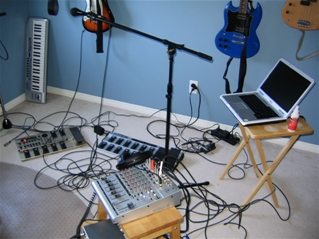
Picked up an M-Audio Firewire 410 on the weekend and boy is my wallet tired. The goal today was to put together the basic live setup:

Coming along okay, sounds not too bad. Need a 6->4 pin Firewire cable. It's pretty fun to jam, I could see writing a lot of songs like this.

Magnatune on Second Life

Magnatune has a Second Life location. Free t-shirts and most interestingly -- audio streams for your lands. Very neat. The info:

  • - Listen & hang out: a large space on Joi Ito's island Kula 1, with themed listening areas for each of our genres (with our streams playing), along with comfy furniture for you to hang out with your friends. Search for "magnatune" in SL to find it.
  • Music for your land: audio streams for over 40 genres that you can use at no cost in your own land. Click on the sign at the Magnatune space in Second Life for information.
  • Tshirt: a free Magnatune tshirt for your avatar
  • Message board: leave us a comment when you visit
  • Film: "Magnatune in six" video showing
  • and an email discussion group for organizing get-togethers there.

Gonna drop by there in a second and pick up a shirt and check it out. I'm "Brad Susenko".

World of War-cash

I guess I should "camp" more on my "credit card statements" as Blizzard has been conducting "raids" on my "money" for the past "year" since I quit "World of Warcraft".

Anyway I'm like a level 20 complainer now. At 30 I think I finally get to talk to a manager so I've got a lot of grinding to do.

DIY Canadian Rehearsal Heating

So I don't know if you know but it's pretty cold in Canada right now. Anyway, the Brad Sucks rehearsal space is in a garage and it's like -25C outside. As a pre-rehearsal measure this is a video of how we heat the garage:

It's pretty effective but it's still goddamn cold out.

Solo Singer/Songwriter Ableton Live Setup

I think I may be able to declare success in the singer/songwriter versus Ableton Live and the Behringer FCB1010 Midi pedal board. It took a lot of thinkin'. I can't say this is the best way, but I've got it working and boy will it be boring for you to read about! So here's what I wanted:

  1. My songs divided up into scenes (verse, chorus, etc) and for Live to automatically advance through them with no input from me.
  2. A pedal that repeats the current scene (for those extended solos or when I screw stuff up).
  3. A pedal that plays the previous scene.
  4. A pedal that advances to the next scene.
  5. For Live to control my Boss GT-6 guitar effects throughout the arrangement.
  6. For Live to automatically apply effects to my voice throughout the arrangement.

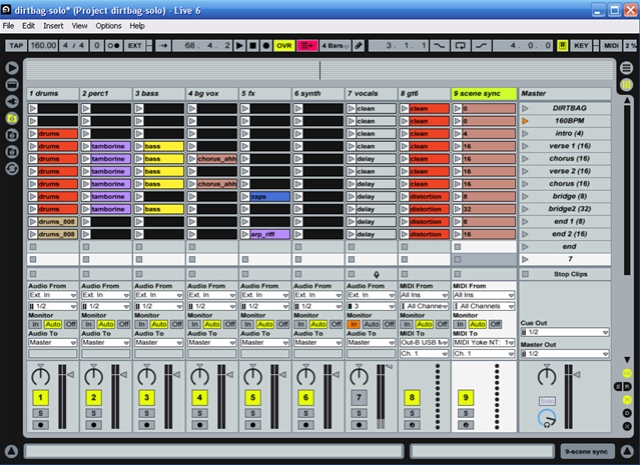
Here's the screenshot of my live Dirtbag set in Live for those who want to follow along at home:

Also used: Midi Yoke and two instances of Bome's MIDI Translator.

SCENE FOLLOWING

First thing was to set up automatic scene progression as Live retardedly does not have this functionality. For this I simply selected all the clips in the scene, entered how many bars I wanted it to play for and selected the Next action.

The problem with this method is that if you have gaps in your arrangement (say a section where the bass doesn't play), the missing clip will stop the progression dead in its tracks and nothing else will play on that track.

So you need to pad it out with dummy clips -- all the black clips in the arrangement in the first screenshot. I used a file with a couple seconds of silence and filled all the gaps in with them. That way you can assign follow actions to those clips and it works fine -- but is tedious to set up (and annoying when you're trying to modify your arrangement).

PEDAL TO RESTART THE CURRENT SCENE PART 1

So we're progressing through the scenes automagically now, should be easy to just restart the current scene, right? NO.

Since we're using the individual clip follow actions (as no scene actions exist), when the clips advance to the next scene, the master clip selection does not. Which means that from a remote triggering point of view, Ableton has no idea what scene you're playing. So there's no way to re-trigger what you're currently doing. Awesome!

My hacky solution was to install Midi Yoke and a copy of Bome's Midi Translator. I then made MIDI Track 9: "scene sync" and routed that out to MIDI Yoke's 1st virtual output. I filled the trick with clips playing note C2 at 100 velocity at the very beginning of the clip.

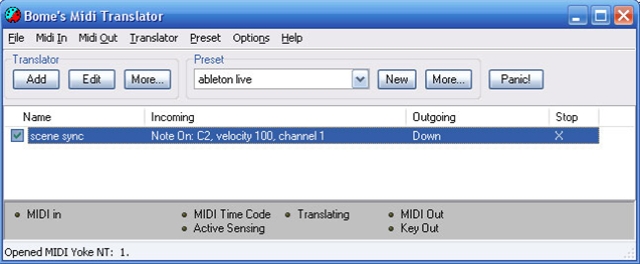
I set up an instance of Bome's Midi Translator to receive on MIDI Yoke's first input and set it to hit the Down cursor key every time it receives note C2 at 100 velocity.

What this means is that if you launch the first scene in the set, the clip in the scene sync track fires a C2 into Bome's Midi Translator which then simulates the user pressing the down cursor key, which moves the currently selected scene down one. So your scene selection will now advance with your song.

PEDAL TO HOLD THE CURRENT SCENE PART 2

Now that Ableton has an idea of what scene we're playing while we're advancing automatically through the scenes, what we want is actually possible.

First I switched the Select Next Scene on Launch preference off. Then I mapped my Midi pedals on the FCB to another instance of Bome's Midi Translator with the input set to my regular Midi port:

So these are set to the keypresses relative to where our follow scene puts our cursor (which is always one scene below the currently playing scene):

  • Repeat scene = Up + Enter
  • Next scene = Enter
  • Previous scene = Up + Up + Enter

CONTROLLING MY GUITAR EFFECTS AUTOMATICALLY

This one's easy enough. I created a "gt6" Midi track and set the output to my Midi controller going into my Boss GT-6. After that all you have to do is send program changes:

Look in the Notes section in the middle. Bank / Sub-Bank, Program. Program is set to 4, so this clip will jump my GT-6 to its fourth patch when it starts.

CONTROLLING MY VOCAL EFFECTS AUTOMATICALLY

This isn't so bad either. I made a vocals audio track, set the input to my microphone and switched Monitor - In on so that my vocals are always heard. Then I filled the channel with empty MIDI clips. I then can modify the clip automation where I want to add effect -- turn insert effects on or off, modify variables, modify sends, etc.

For now I chose to map my FCB expression pedals to the sends so that I can mess with my vocal effects if I want to, adding delay whenever I feel like it, etc. I'll think about this more during actual performances.

THE END

Well, it works. I can have the backing tracks going, play guitar and sing, have Ableton modify my guitar patches and vocal effects automatically and I can alter the arrangement on the fly as well as my vocal effects with my feet -- but holy lord.

Ableton Live is nice and all, but that was hard and I still haven't combined everything into one big set (because Live has no ability to switch between sets via Midi). I've made three sets for different songs of mine now and have tried to keep the track template the same so hopefully that will help.

I'm also not sure how I'll be able to jump between songs as I've started to dislike doing pre-planned sets when I play live. Possibly I'll wind up programming a bank on the FCB per song, so I can switch songs by switching banks.

I get the impression the folks at Ableton could use some more time around singer-songwriter types and full bands. They've got the DJs covered, time to see what the other lads need because while the features lacking are tremendously important, I can't imagine it's actually very much code-wise.

Adding scene follow actions would simplify this entire process a ton and seems easy. Also building in a MIDI->keyboard macro system like Bome's Midi Translator also seems trivial and would add a ton of flexibility to the program.

Now I'm pretty sick of saying the word "clip". That is all.

My Wii Guitar Idea

I still don't have a Wii (out of stock everywhere and also I haven't tried very hard) but that hasn't stopped me from fantasizing about things to do with the accelerometer in the Wii controller.

First I came across this collection of videos of the 20 Greatest Guitar Solos. My main thought was "a little guitar solo goes a long way".

Then I watched this Wii Wiimote Ableton Live Controller video.

So here's my Wii guitar idea:

1. Strap the Wiimote to the headstock of your guitar.

2. Run your guitar through some effects, such as say, a flanger or a filter.

3. Have the Wiimote control various expressive parameters of the effects.

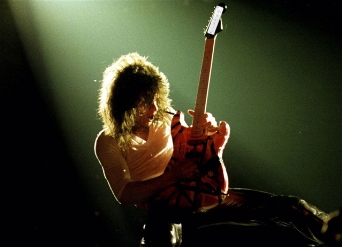
This way, when you pull this move:

Not only would you be looking dead sexy, you'd also be making expressive changes in your guitar sound based on the movement of the accelerometer in the Wiimote. Everybody wins!

Mavericks show

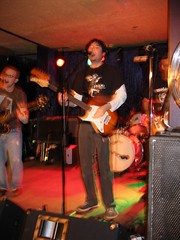
Brad Sucks Live @ MavericksIt was a fun show last night, thanks to The Coggs for having us and everyone for coming out. (A few pictures are here.)

In the crowd were multiple CBC Radio 3 Podcast listeners who heard my stuff the other day as well as a fellow from the open-source Jokosher project, which was sweet.

It was Jacquie in the Kitchen's farewell show and they put on a great one.

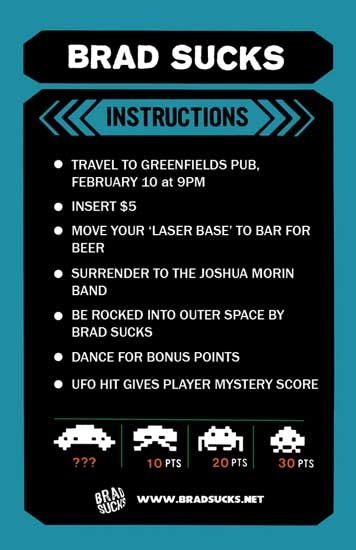
Our next (and final one before Rob leaves and we become a three-piece) show is on February 10th. We'll be playing every damn song we know and I'm still looking for an opening band.

Things I've learned about Ableton Live
  • Live has no facility for quickly switching between songs (aka "sets") via MIDI so you have to pile them all together into one giant set (unless you want to use the mouse and keyboard to move to your next set). This means the order you perform your songs in will be fixed on whatever order you have queued up, which blows. (Unless I can think up a clever way to jump around via MIDI.)
  • After thinking about it I thought the easiest way to start using Live in a live setting would be to have a fixed sequence of scenes (verse, chorus, verse 2, chorus 2, etc) which would go off without any input from the user (me), but I could hit a pedal to stay in any given scene if I wanted to pad it out, solo more, improvise, etc. But there's no "scene follow action", so you have to rig up some crazy solution via MIDI.
  • By far the majority of tutorials out there are for "live looping", Kid Beyond style or DJing. I can't find much in the way of singer/songwriter tutorials or using Live inside a conventional band.
  • The most commonly used technique with a midi pedal board as far as I can see is instead of triggering specific scenes you set up pedals for "next scene" and "previous scene" so that you can advance (and backtrack if needed) through the scenes. No functionality for this exists inside of Live so you have to use Bome's Midi Translator or an equivalent to simulate keystrokes when triggered via MIDI.

I think what I want to do will be possible, just takes a lot of fussing around.

Behringer FCB1010

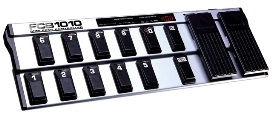
So I bought a Behringer FCB1010, it's a (cheap as hell) twelve switch, two expression MIDI foot pedal. I'm thinking I can control my laptop with it while I play guitar and sing. 

Anyway, the entire experience has been great but not because of the device itself. The manual is terrible, the factory settings don't work with Ableton Live out of the box and programming it via the foot pedals is tedious.

One of the greatest things about buying gear for me as a total nerd is when there's a thriving user community around whatever I just bought. And there's a great one around the FCB1010. Here's some of what I've found:

  • There's a great Yahoo Group full of resources for it. Photos, utilities, tutorials, patches, sysex dumps, hardware mods and more.
  • Hackers have made $10 replacement firmware chip for the FCB1010 that adds a lot of great functionality such as tempo tap, stomp box mode, not needing to put the device into "sysex receive mode" to transmit patches to it and more.
  • There's an excellent home-brew PC Editor for programming the device.
  • A great FAQ.
  • Plenty of tutorials for getting the FCB working with Live.

As I was describing this, particularly the replacement firmware, a friend of mine wondered why Behringer doesn't open source their firmware. They make their money on the hardware (unlike video game consoles for instance) and are also widely criticized for ripping off other company's designs, manufacturing them cheaply and selling them at a fraction the price.

Seems to me they'd have nothing to lose by open sourcing their firmware. Hackers could add all the functionality they want, people would buy their products with the intention of tricking them out, it's free R&D that they can fold into future devices, and their nerd karma would go through the freaking roof.

So long Rob

Rob Cosh, friend and guitarist of Brad Sucks Live is leaving the band. There's no drama -- Rob's helping me produce my next album so we still tight. He's got his own music to do and a family and business to tend to. He was the motivational force behind me getting my ass in gear and doing the live stuff, so I owe him a huge thanks.

Rob will still be playing our two remaining dates (on January 27th and February 10th) so be sure to come out for the rock!

As for the future, he says peering into his crystal ball, I had been thinking about toning back the heavy rock and getting things to sound a bit more like my recorded stuff with the synths and the effects and the so on. Brad Sucks fans that came out tended to be a little put off by how guitary the show was and while it's been huge fun it's probably not where my heart lies. So I think I'm going to dial it back to a three piece augmented by a lot of laptop use and see how that goes.

After a year and a half of performing I'm also interested in trying out playing solo again. I love the sound and energy of a live band, but I've been watching some Ableton Live performance videos (1, 2, 3) and am inspired to try it. I ran out and bought an FCB1010, which I'll be blogging about later.