Selling out to Twix

I keep meaning to blog all the promotions I turn down so I look cool and counterculture-ish. The reality is that I only turn them down because what they offer is so depressingly small (which is probably insultingly in line with what I'm worth). Here's a snippet from one I received today:

Hi Brad,

My name is [...] and I'm working at [...], a marketing firm based in Baltimore, Maryland. I wanted to reach out to you to see if you’d be willing to help us with a project with Twix. There are only 2 more weeks in which we have to gain several thousand more entrants into a Twix sweepstakes, with prizes totaling an amount of $4800. We were wondering if you’d be able to post a banner up on your website that would link to [...]. In return for you, we have tons of Twix bars to give away and we even have a couple MLB baseball tickets to give away in the Tampa Bay, Houston and Atlanta areas.

It's official Brad policy to not be against selling out. I certainly have lines I won't cross, but for the most part I support the idea of making money. But to slap some ads on my site for some free Twix bars is scraping the bottom of the barrel, even for me. Baseball tickets in another country don't interest me much either unless they come with plane tickets.

But then I thought: "Whoah, he said tons of Twix bars". What could I do with a stupid amount of Twix bars? Why, I could have the most chocolatey live show ever! Just think how they'd pile into the club if the sign said "Brad Sucks Live Tonight + FREE ALL YOU CAN EAT TWIX BARS".

So I wrote back: "How many free Twix bars are we talking about here?" No reply so far. I hope that's not the last time in my life I get to ask that question.
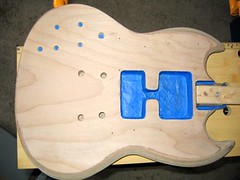
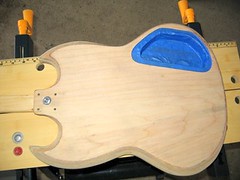
Guitar painting web album

I've been testing out Picasa Web Albums and love it. It's a whole different animal than Flickr. It lacks just about everything cool that Flickr has but somehow that doesn't matter much to me. I usually only want quick photo albums to send to friends and family and this does the trick and works nicely from Picasa. Also whatever they're doing with pre-loading on there is awesome because switching from picture to picture is lightning fast, I love it. Here's my guitar painting photo album.

I do wish it had some more hotkeys for common photo actions like deleting and captioning. Also a few more sizes of images that I could link to on the blog (update: or even allow me to link to the images at all) would be nice as well.

Guitar painting: part 4 (sanding sealer)

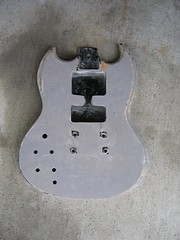
Besting the workbench, I masked my guitar:

guitar masked & sanding sealerguitar masked & sanding sealer

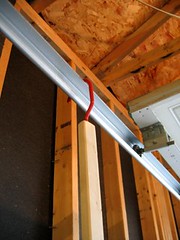
Hope I did a good enough job. It was a pain in the ass to do, lots of exacto-knife work. I also took a tip from Paint Your Own Guitar and attached a 2x1 to the neck joint and stuck a bike hook in the end. This way I can hold it by the 2x1 and move it around when I'm painting it and then hang it up to dry when I'm done.

guitar masked & sanding sealerguitar masked & sanding sealer

The 2x1 works well except that the body flops around a bit as I move it, bending at the bolt I put in. I'm too afraid to make any new holes, so I taped some thick cardboard to the sides of the 2x1 to protect the neck socket as I throw it around.

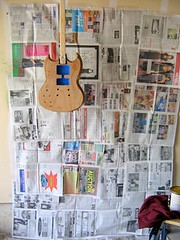
Also I made a painting area in the garage. A lot of tape and country newspapers went into the making of this:

guitar masked & sanding sealer

And I applied the first coat of sanding sealer. I read a lot of guitar painting tutorials (well, like four) and some did this and others didn't bother. Luckily I found some sanding sealer at the local hardware store so we're on. I'm sure I'll make up for this in the sanding stage as I can't find any sandpaper with grits over 320 around here.

Other parts in this series: 1 2 3 4 5 6 7 8 9 10

Guitar painting: part 3 (delays)

I got annoyed sanding on an overturned recycling bin (aka my workbench) and there happened to be some Father's Day sales on workbenches. So I bought one of these for $20:

I've spent the past week trying to set this up in intermittent spurts. Turns out not only am I retarded and stupid, I am also inept. Here's what my assembled version looked like a couple days ago:

Sickly. Looks like it needs to be put down. Since then I went and bought some more nuts (you can just buy them) and have stabilized it somewhat, but now the wood for the top doesn't fit anymore. So I really don't want to talk about it anymore.

I finally found some Krylon paint in a craft store. There was a sale on so I think all the sexy colors were taken. Here's what I got:

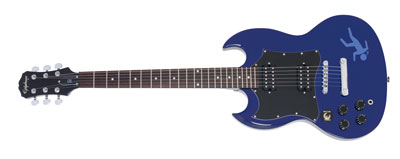
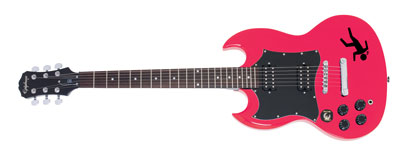
I think I'm going to paint it "true blue". I really thought about bright yellow or pink, as I like those colors, but then I thought maybe I should go for something more conservative as those loud colors seem like ones you could get sick of real easily. And blue's still a nice non-standard guitar color. My little logo falling guy will be in black.

Also my order from Stewart MacDonald showed up today. Here are my Golden Age pickups:

Getting these has made me regret tearing my guitar apart because I really want to try them out, but I can't until I paint the stupid thing.

Other parts in this series: 1 2 3 4 5 6 7 8 9 10

Weird Al Yankovic's Digital Distribution

Grant Robertson has a good article on The Digital Music Weblog about Weird Al Yankovic's cut from digital distribution:

King of comic rock, Weird Al Yankovic says digital is a raw deal for artists like himself. When asked by a fan whether purchasing a conventional CD or buying a digital file via iTunes would net Yankovic more pocket money the artist answered on his website.

"I am extremely grateful for your support, no matter which format you choose to legally obtain my music in, so you should do whatever makes the most sense for you personally. But since you ASKED... I actually do get significantly more money from CD sales, as opposed to downloads. This is the one thing about my renegotiated record contract that never made much sense to me. It costs the label NOTHING for somebody to download an album (no manufacturing costs, shipping, or really any overhead of any kind) and yet the artist (me) winds up making less from it. Go figure."

This is one of the reasons why I get so tired with a lot of the music industry criticisms out there: a lot of them depend on the idea that artists make nothing worthwhile from CD purchases, which may be true in some cases, but not in all.

I get asked the same question occasionally and for my indie-self I make about the same whether you buy a CD direct from me or via a digital music store. (Update: except for Magnatune actually, where I only get 50% of what you pay.)

kid radio

kid radio - awesome school project by Paul Rubenstein, teaching kids in high schools in Brooklyn, Queens and Manhattan to build their own guitars and tin-can amplifiers. Man, I wish I did this in school. [via]

Google Browser Sync

Google launched this Google Browser Sync tool for Firefox. It's mean to keep your settings in sync between multiple copies of Firefox. At first I was excited because only weeks ago I had the idea for something like this as setting up Firefox on new Windows installs is annoying. But it doesn't sync your Firefox extensions! Weak.

Rojo review

I tried to switch from Bloglines to Rojo for my main RSS reading. Someone I respect but can't remember the name of mentioned they had been lured away from Bloglines by Rojo so I thought I'd give it a shot. In the interest of improving Rojo, here we go:

  • I had already made an account a long time ago, couldn't remember my password. The password retrieval didn't work. I sent them an email and got a response back pretty quickly, verifying the password retrieval was broken. They got me a new password in a few hours though, not too bad.
  • Right off the bat I want to like Rojo. It's very slick and seems to have a lot going on for it. I fantasize about all the awesome ways it's going to help me read and manage all my feeds with its web 2.0 goodness.
  • I import all my feeds. Very easy. I don't like the page layout though -- I'm a brutal RSS skimmer and the headlines are too faint for me to skim very well. I whip up a Greasemonkey script to embiggen and embolden the entry titles and am happier with it.
  • I really like the "Add mojo" idea (it's very similar Digg-ing something, but inside the RSS reader). Not many people use it though and also I don't know what adding mojo to an article actually does for me.
  • I feel confused by the entries that are rolling in. I realize it's set to sort stories by "RELEVANCE". What the hell does that mean? I'm an info-nerd, I just want everything in chronological order. I switch it to stories sorted by date.
  • Stories sorted by date is still weird compared to Bloglines. I really want the stories sorted by date and also by the category I've put them in. If there are five new Boing Boing posts I'd like them grouped together rather than mixed in with all the classified ad feeds I subscribe to. As I cruise through my news I feel sort of lost, unaware of the context of what I'm reading. Is this written by someone I know? Etc, etc.
  • To make matters worse, a lot of the feeds I imported are labelled as "Untitled feed".
  • I don't like having to go through pages of items. Bloglines lets me scroll through everything that's new.
  • Marking as read is weird and clunky. The Mark All Feeds Read should be over near the feeds. I turned on "Automatically mark a feed as read after viewing that feed" but that doesn't work for reading new items? Also when I'm paging through the new items I have to remember to hit "Mark Page Read" before I hit "next page". Bleah.
  • The new item counts on the left seem to always be out of sync with reality.
  • Some feeds (like Negatendo's Livejournal for instance) just show html craziness.
  • Site could be more responsive, it was a little slow earlier today when I was trying it out.

It's a bit prettier than Bloglines (though more cluttered) and certainly more web 2.0-ish. If more people used it, I might be sucked in more by the Mojo feature. An RSS reader and Digg functionality go together nicely (for me at least). But the confusing feed order probably means I'm headed back to Bloglines for the time being.

Guitar painting: part 2 (the sanding)

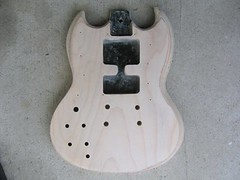
I sanded the guitar over the past couple of days. Before:

just about stripped (front)

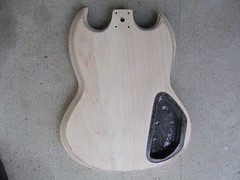
After:

sanded backsanded front


Not pictured: me using my 26-inch pythons to remove the bridge screw sockets. Train, say your prayers and eat your vitamins.

So there's actual wood grain going on there, sweet. Anyway, sanding by hand sucks. I got most of it done but borrowed one of them oscillating sanders to get rid of the really stubborn stuff. Also doing the little rounded tips at the end of the guitar was a living hell on ice.

I ordered some Golden Age Humbucker pickups for it. They're cheap and they have really decent ratings at Harmony Central. I'm too poor and shoddy a guitar player to buy really nice ones so hopefully these'll do. I can't imagine much worse than what was in there before. Can I also say I care so little about "classic tone" that it's ridiculous. I've been reading a lot about pickups and everyone's bizarrely concerned about how "classic" their tone is. When someone tells me their pickups sound like they're from the 50s I think "oh, you mean crappy?"

Thanks to Paul Roub for pointing out that I could ditch my big ugly pick guard and use plastic mounting rings instead. I love the internet.

So next is to treat all the dings and notches and fill the holes in the body, re-sand lightly and then put some sealer on it. I still haven't found where they sell Krylon spray paint in Ottawa, but I'm a ways off from actually painting. Getting closer though...

Other parts in this series: 1 2 3 4 5 6 7 8 9 10

Guitar designs

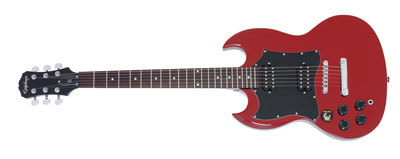
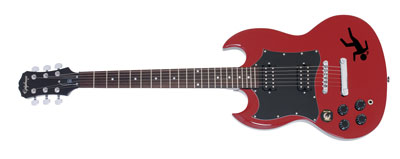
What to paint my guitar. A normal person might have thought of this before they stripped it down, but not me baby. Anyway I fudged up a little photoshop thing to help me try colors on. Here are some quick ones I did:

Oh I lack the talent. Anyway here's the Photoshop PSD file if anyone wants to, uh, remix it. The source for my guitar, if you will...

Guitar painting: part 1

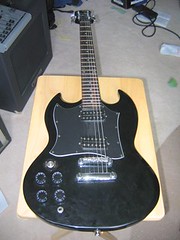
This weekend I got it into my head that I want to paint my old guitar (as well as replace the broken switch and the crappy pickups). I also want to learn how to modify guitars instead of being a guitar retard (or guitard) for the rest of my life. Here's what I've gotten done so far:

guitar before

Gibson Epiphone G-310. The first left-handed guitar I owned and the guitar I used for I Don't Know What I'm Doing. Before this I was playing an upside down left-handed Wayne's World Fender telecaster.

the tools

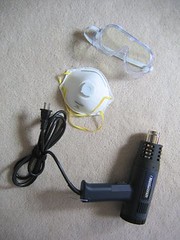
The tools I'll be using (forgot to include the putty knife I used to strip the paint). Heat gun (or pistolet thermique in French), mask, goggles.

epiphone

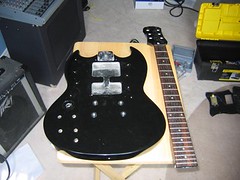
Tore the guts out and detached the neck. It's at this point I'm realizing I may never get the guitar back together again without having to cry to a professional who will tease me. I also can't get those metal bridge things out no matter how much I swear, so I guess they're staying in while I do this thing.

stripped

I move everything to the garage. Taking the paint off the back is surprisingly easy though it's hard to hold the guitar in place while I heat gun and strip it.

just about stripped (front)

Flash forward a couple of sweaty hours and I think it's more or less stripped. The edges were a pain in the ass. It can still use some clean up, some black remains on the edges, but I'll wait until someone's around who can hold it for me.

So next is sanding. Also deciding if I'm going to do the neck and headstock. I can't find much in the way of instructions for that on the internet and I'm hesitant to try it in case I damage the fretboard. Also I have to figure out what pickups I'm putting in this thing as well as find a replacement pickup switch.

Oh and what color am I going to paint it?

Other parts in this series: 1 2 3 4 5 6 7 8 9 10

The Infernoptix Digital Pyrotechnic Matrix

The Infernoptix Digital Pyrotechnic Matrix is pretty much screaming to be used in a live show or possibly as kick-ass road signs.

Forget big screen and flat panel TVs. The Infernoptix Digital Pyrotechnic Matrix is the latest in high-impact visual and audio entertainment. The 96-inch screen employs computer-controlled bursts of fire, in a 12 x 7 array, to create scrolling text, simple animations, freehand sketching (via mouse), and an audio level meter.

Some videos: